Published June 5, 2026
Turning Lectures into Smart Notes with Markdown
A practical workflow for turning one lecture recording into a transcript, a structured summary, and a markdown article your team can search, update, and republish for years.
Bismillah,
Open the recordings folder on your phone. How many lecture files are still sitting there, never replayed? Most of us probably have dozens, sometimes hundreds. The knowledge is there. It is just buried.
The problem is not the recordings. The problem is the gap between a recording and readable text. Replaying a 90-minute lecture takes 90 minutes. Typing it out takes three to four times longer. Cross-checking every Qur’anic verse and hadith the ustadz mentioned takes even more.
Transcribing a long audio file and turning it into notes, articles, or teaching material takes serious time. A team can spend days on it, and only when the team has the time, because schedules fill up and sitting down to retype a recording rarely makes the priority list. Without a clear workflow, a recording stays a recording. It never becomes knowledge you can read at any moment in the form of text.
One Recording, Many Forms
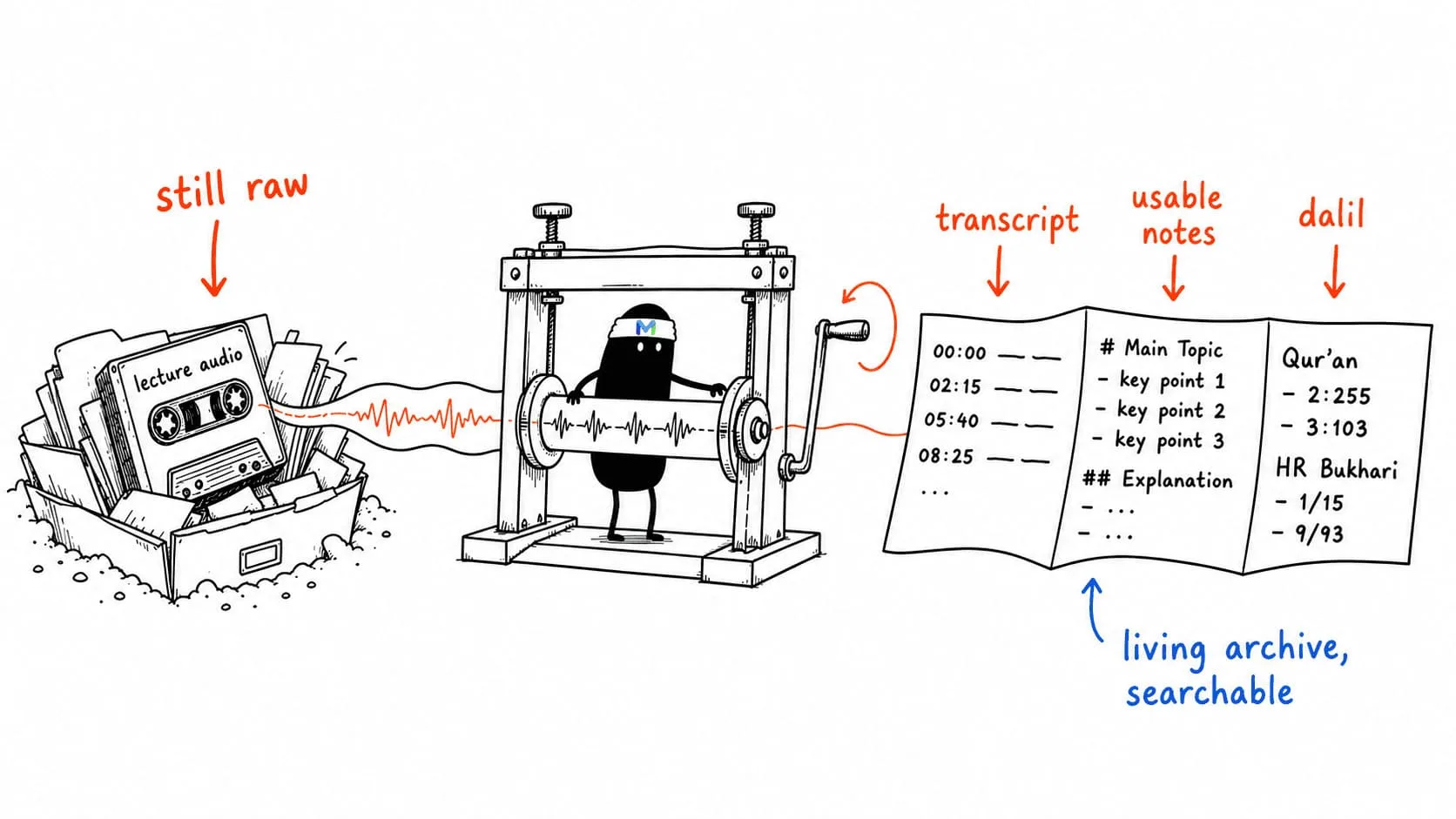
When the workflow is right, a single lecture can become several things at once:
- A full transcript with timestamps so a reader can jump straight to the exact minute in the original audio.
- A structured summary ready to share in a group chat or weekly bulletin.
- A reference list of every Qur’anic verse and hadith cited, with translation and source attached.
- A markdown article ready to publish on your site or store in your team’s repository.
What used to take an editing team days now lands in minutes after upload.
Why Markdown?
Markdown sounds technical, but that is exactly why it works for da’wah teams. The format gets out of the way and lets you focus on the meaning, not the layout.
A few practical reasons:
- Easy to store in a repository. One
.mdfile per lecture. Organize by ustadz, by kitab, by masjid, whatever fits your team. - Easy to update. A correction to a citation is a one-line edit, not a re-layout.
- Easy to republish. The same file can become a web page, a PDF, or a printed handout, without rewriting anything.
- Built to last. Ten years from now, a markdown file still opens. It is not locked to a single app that might disappear.
This matters for anyone who cares about ilmu. A lecture archive is meant to be an inheritance, not disposable content.
A Practical Workflow with MajelisNote
Here is what the flow looks like in practice:
- Upload the recording. Audio, video, or even a YouTube, Telegram, or Facebook link from a masjid lecture. MajelisNote handles the formats so you do not have to convert anything first.
- Automatic transcription. The system recognizes Arabic, Indonesian, Malay, and English — even when the speaker switches mid-sentence. Each voice is labeled, so you know which line is the ustadz and which is a question from the audience.
- Verse and hadith detection. This is usually the most time-consuming step when done by hand. Every Qur’anic verse and hadith mentioned in the lecture is detected automatically, with sources and translation attached. Your job becomes verification, not searching from zero.
- Export to markdown. One click. The output is clean, structured, and ready to drop into a repository or paste straight into a web article.
What Does Not Change
This is not a replacement for the adab of seeking knowledge. Verifying references is still the responsibility of the team. The ustadz remains the source. AI only trims the mechanical work like typing, matching, and formatting, so your time returns to what actually matters: understanding the lecture.
That is the intent behind MajelisNote. Not to replace scholars or students, but to support them. So the knowledge that used to be lost in a queue of recording files can finally be organized, readable, and reachable by more people.
Start with One File
You do not have to migrate your whole archive on day one. Start with one recording that you replay most, or the one that matters most to your audience. See the result. Feel the difference.
After that, the workflow tends to take care of itself. Once a lecture becomes a searchable markdown article, your team will quickly see there is no need to go back to the old way.
Seven months from now, when someone asks about a point from a lecture you ran last spring, you will not dig through folders. You will type one keyword.
That is the difference between an archive that is stored, and an archive that is alive.
If the recording is not yet searchable, begin with the Islamic lecture transcription workflow before building the Markdown archive.